AI Legal Copilot for Law Firms
Artificial intelligence has moved well beyond experimental prototypes in modern legal operations. Across solo practices, multi-partner law firms, and corporate legal departments, attorneys increasingly rely on AI to summarize lengthy court orders, flag hidden contract liabilities, and accelerate initial pleading drafts. Yet adopting generic, public AI chatbots introduces a critical compliance hazard: pasting privileged client facts into external cloud models threatens attorney-client confidentiality and GDPR compliance.
The practical alternative for legal professionals is a local AI Legal Copilot embedded directly inside your practice management workspace. Rather than moving sensitive case records into disconnected third-party tools, Legalistik runs AI assistance locally on top of your structured case dossiers, court calendars, and uploaded documents.
Why Generic Public AI Tools Pose Risks to Law Practices
When an associate copies an unredacted settlement agreement or commercial dispute judgment into a consumer AI chatbot, the firm loses visibility over retention policies, sub-processors, and potential training pipelines. Even where paid tiers promise zero retention, copying case data out of your matter system creates fragmented audit trails and version control headaches.
Furthermore, standalone chatbots lack operational context. They do not know the presiding judge assigned to a dossier, the statutory filing deadline recorded on your docket, the claim value used for tariff calculations, or the unpaid invoice balance waiting for partner sign-off.
Inside the Legalistik AI Legal Copilot Workflow
Legalistik embeds AI assistance across three core touchpoints, starting with the AI Firm Briefing on your Executive Dashboard, which greets managing partners and associates each morning with a concise summary of urgent deadlines, upcoming court hearings, active matters, and open receivables.
1. Scoped Copilot Queries Across Firm Data, Case Files, and Statutes
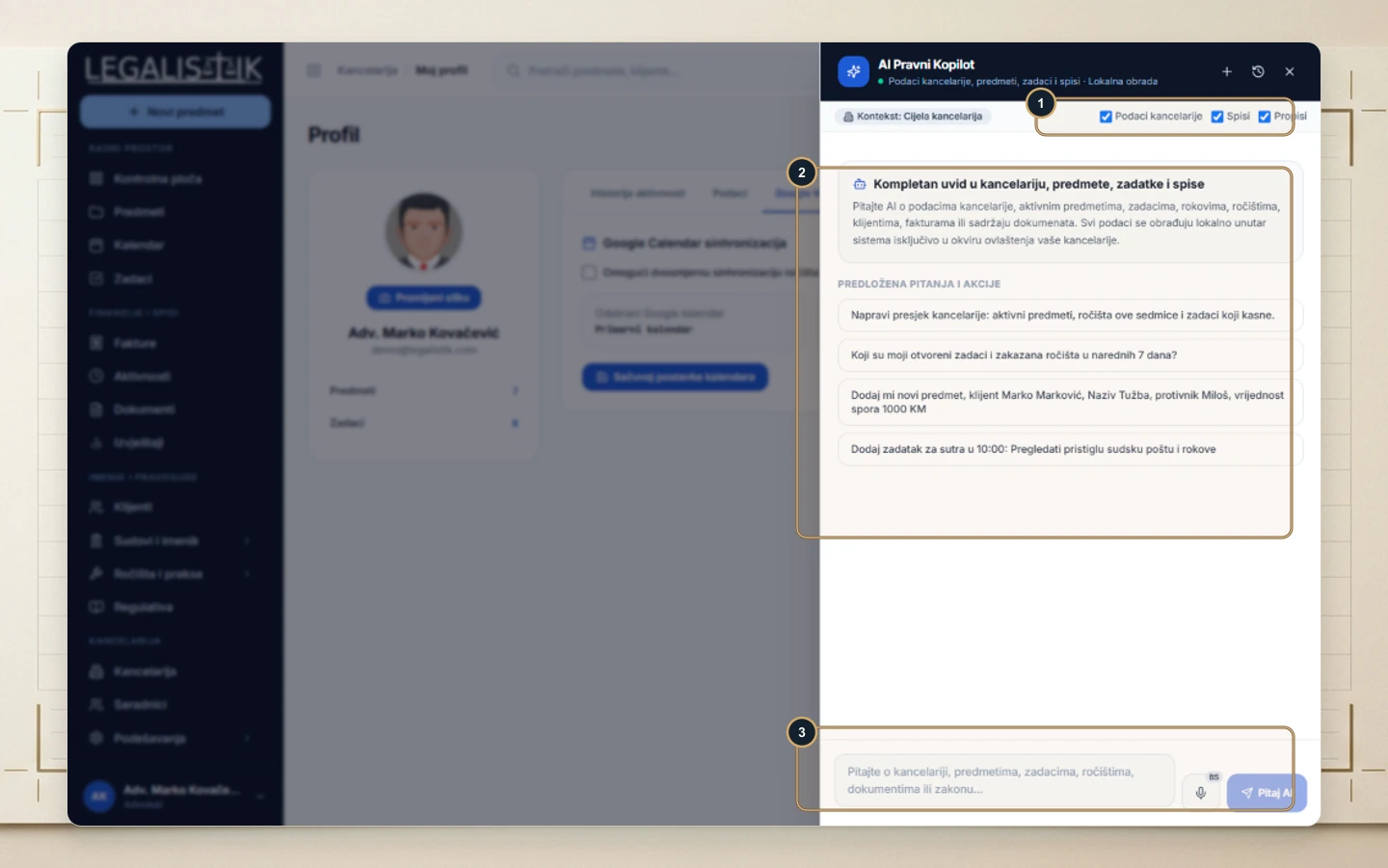
From any screen in the application, clicking AI Copilot in the global header opens a context-aware side drawer where you control exactly what the assistant queries:
- Firm Data: Ask natural-language questions about this week’s court schedule, associate workloads, or overdue invoices.
- Case Files: Inspect recent updates, pending filings, or party details inside specific active matters.
- Statutes: Cross-reference procedural concepts with the searchable Legalistik Regulations Database.
Users can type requests, launch suggested one-click prompts for weekly briefings or quick matter creation, or dictate instructions via voice input.
2. Local AI Document Analysis for PDFs and Contracts
Opening any document row in Legalistik and clicking AI Analysis displays the original PDF side by side with four structured intelligence tabs:
- Summary: High-level overview of parties, legal obligations, claim amounts, and procedural posture.
- Deadlines: Automatically extracted statutory appeal terms and contractual notice dates ready to verify against your docket.
- Contract Risks: Highlighted penalty clauses, unilateral termination triggers, indemnification gaps, or ambiguous liability caps.
- Anonymization: One-click GDPR redaction checks identifying personal identifiers before documents are exported or shared.
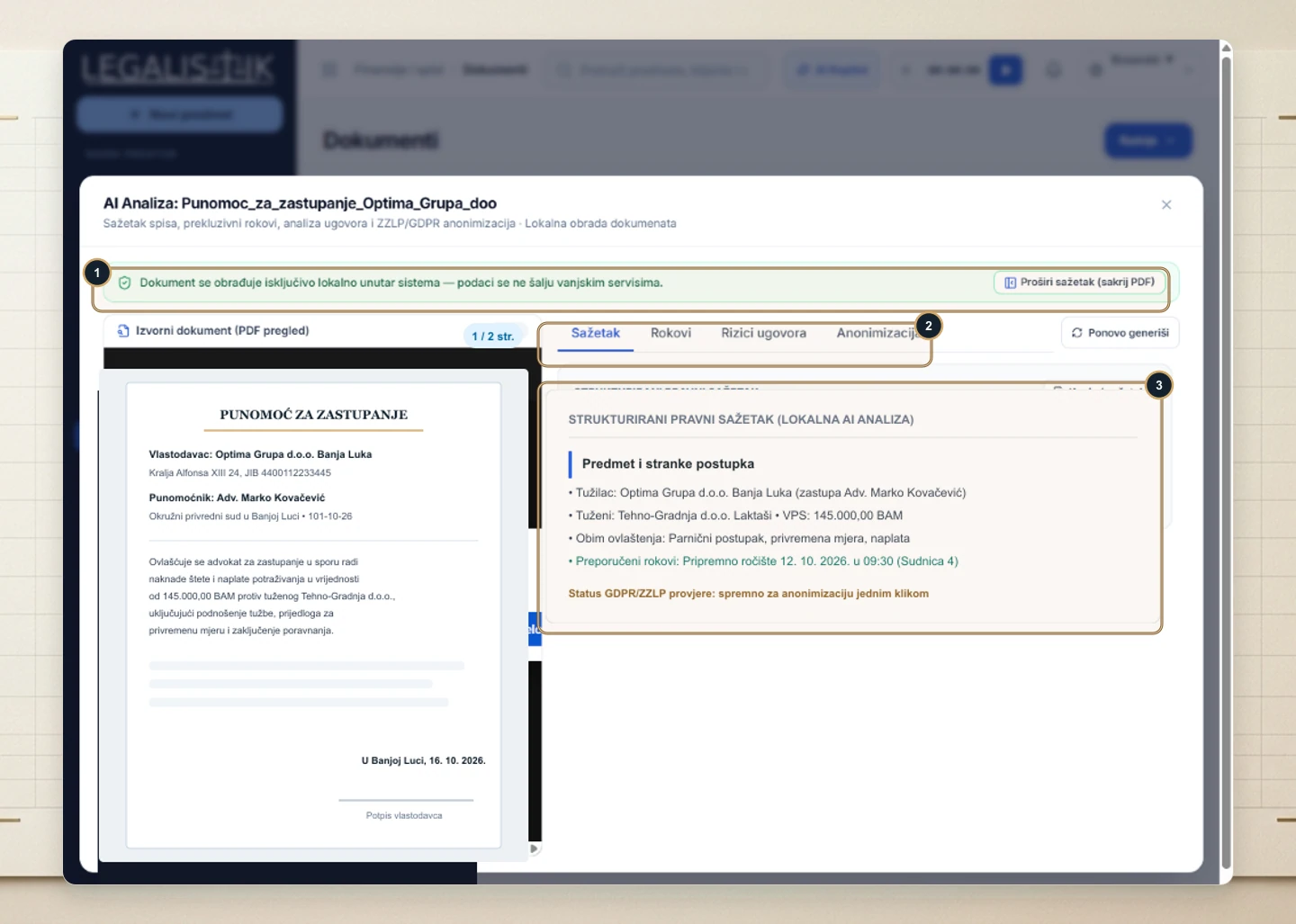
Because processing runs 100% locally inside your workspace, confidential exhibits and client agreements never leave your firm’s controlled environment. Step-by-step instructions are covered in the guide on adding, searching, and running local AI document analysis.
3. Local AI Pleading Generator (.docx) & Case Chronology
Inside each electronic dossier in the Cases & Matters module, the dedicated AI & Tariff tab combines pre-filled case metadata with drafting automation. Because client names, opposing counsel, court headers, and docket numbers are already structured, attorneys select the pleading type, preferred script, and legal instructions to generate a formatted Microsoft Word (.docx) draft locally—eliminating repetitive header formatting.
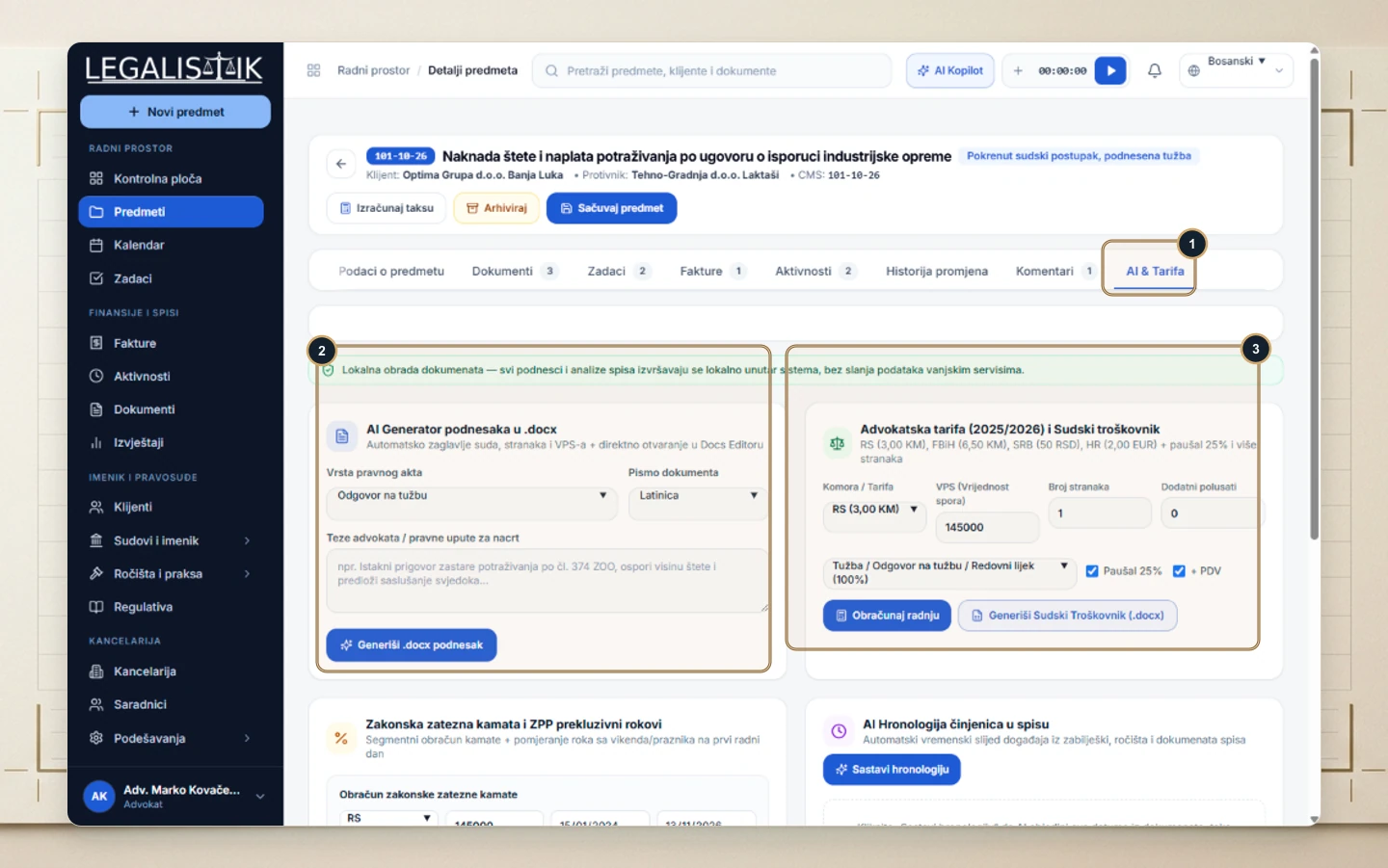
The same tab includes an AI Case Chronology timeline to reconstruct complex factual histories alongside built-in statutory interest and Bar fee calculators inside each case dossier.
Comparison: Public AI Chatbots vs. Legalistik Local AI Copilot
| Evaluation Criteria | Generic Public AI Chatbots | Legalistik Local AI Legal Copilot |
|---|---|---|
| Client Confidentiality | Prompts sent to external public APIs | 100% local processing inside your workspace |
| Matter & Docket Context | Zero awareness of parties, judges, or deadlines | Natively connected to cases, calendars, and billing |
| GDPR Redaction Support | Manual scrubbing required before pasting text | Built-in GDPR anonymization inspection tab |
| Pleading Formatting | Plain unformatted text requiring heavy cleanup | Formatted .docx drafts with court and party headers |
| Deadline Verification | Manual date entry into external calendars | Side-by-side PDF review and deadline extraction |
Law Firm Implementation Checklist for Safe AI Adoption
Before rolling out AI workflows across your partners, associates, and paralegals, enforce these practical standards:
- Prohibit unvetted public tools: Establish a firm-wide policy banning unredacted client files from consumer AI portals.
- Keep case metadata clean: Complete party roles, court identifiers, and claim values at intake so both AI drafts and merge templates stay accurate.
- Mandate attorney sign-off: Treat AI summaries, risk flags, and
.docxdrafts as structured acceleration tools—always verify citations, dates, and procedural rules before court submission. - Align with RBAC & security controls: Pair AI access with role-based permissions and EU hosting standards outlined on our Data Security page.
Conclusion
When AI operates inside a structured, privacy-first legal practice platform rather than an external browser tab, firms gain measurable drafting speed without sacrificing confidentiality. To explore the daily briefing banner and header copilot drawer in detail, see the Dashboard & AI Legal Copilot help guide.