




Tasks & To-Dos 2 min read Updated: 2026-11-14
Kanban Board (Visual Task Pipeline)
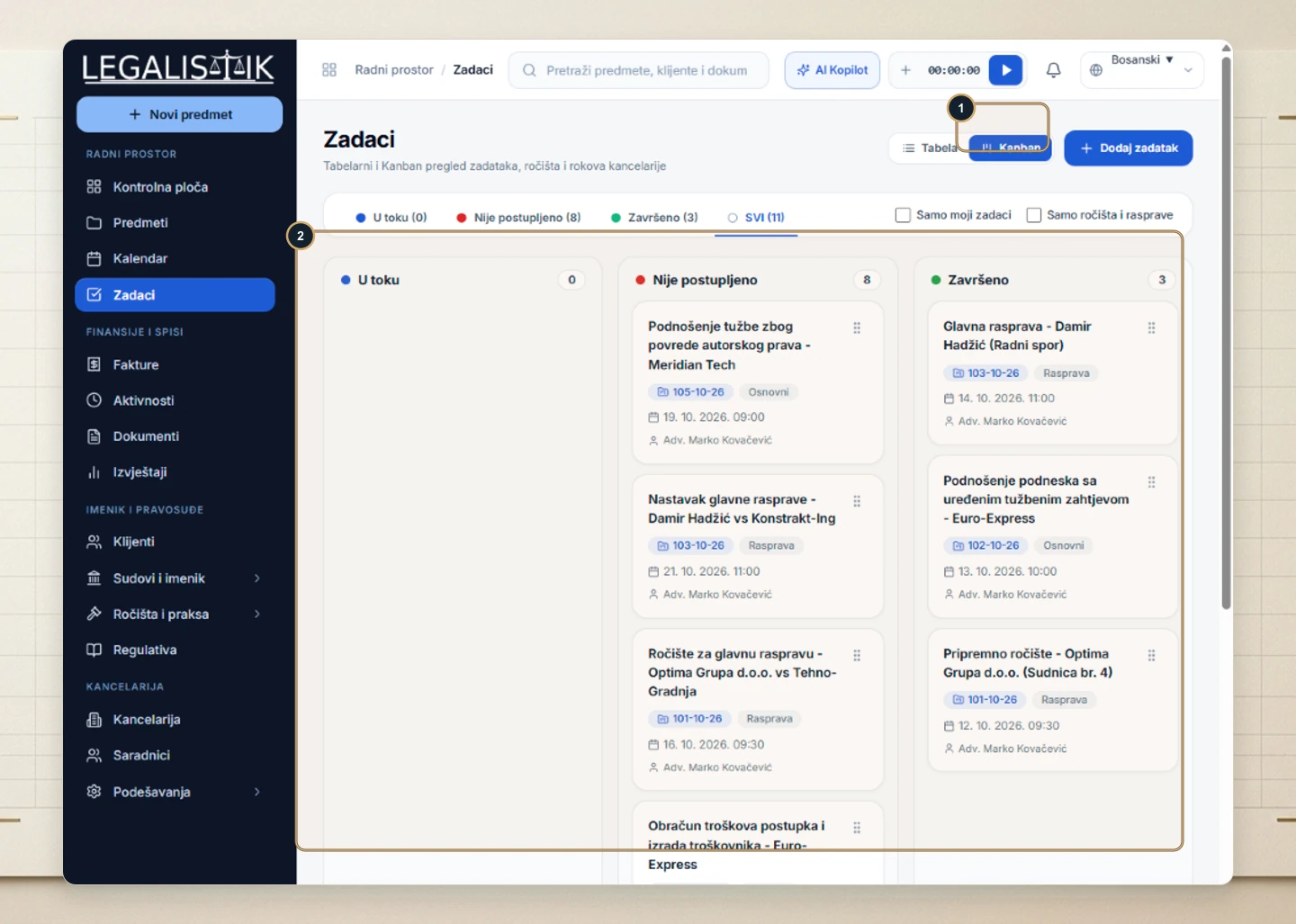
Alongside the filterable table view, the Tasks module includes an interactive Kanban Board so attorneys can scan workload progress at a glance.
Working with the Kanban Board
- (1) Navigate to Tasks and toggle the top-right switcher to Kanban.
- (2) Task cards are organized across In Progress, Overdue / Pending, and Completed columns showing the case ID, type pill, due time, and assignee.
- Drag and drop any card between columns to update its status across the firm calendar and dashboard.
Filtering & Real-Time Workspace Sync
Use the Kanban toolbar filters—such as My Tasks Only, Hearings Only, or search by client and case ID—to focus strictly on your active workload. Moving any card across columns immediately updates its status across the Tasks table, shared Calendar, and Dashboard priorities for everyone assigned to that matter.
