Online Legal Consultation Booking Guide
Some of the biggest productivity drains inside a law firm have nothing to do with complex legal research—they come from endless phone calls and back-and-forth emails asking, “When are you free for a quick consultation?” Every interruption during motion drafting breaks concentration, while prospective clients searching outside business hours frequently move on to the first firm that lets them book immediately.
Legalistik’s Online Client Booking module replaces manual scheduling overhead with a client-friendly self-booking flow that respects your live courtroom commitments and preserves attorney sign-off control.
Why Generic Calendar Tools Fall Short for Legal Practices
Standard scheduling widgets built for sales teams fall short in two crucial ways inside a law firm. First, they live outside your electronic case docket and cannot automatically factor in court hearings, internal deadlines, or team availability across multiple attorneys. Second, most auto-confirm appointments blindly without giving partners a screening gate for conflict checks or matter suitability.
In Legalistik, the booking engine queries your firm’s live legal calendar in real time. If an attorney has a scheduled court hearing on Tuesday from 09:30 to 11:30, those time blocks are automatically hidden from public view—preventing double-bookings without manual calendar blocking.
Setting Up Your Branded Booking Page & QR Link
Configuring public booking takes only minutes inside Hearings & Case Law → Online Booking, as outlined in the help guide on Online Booking for Client Consultations & QR Link.
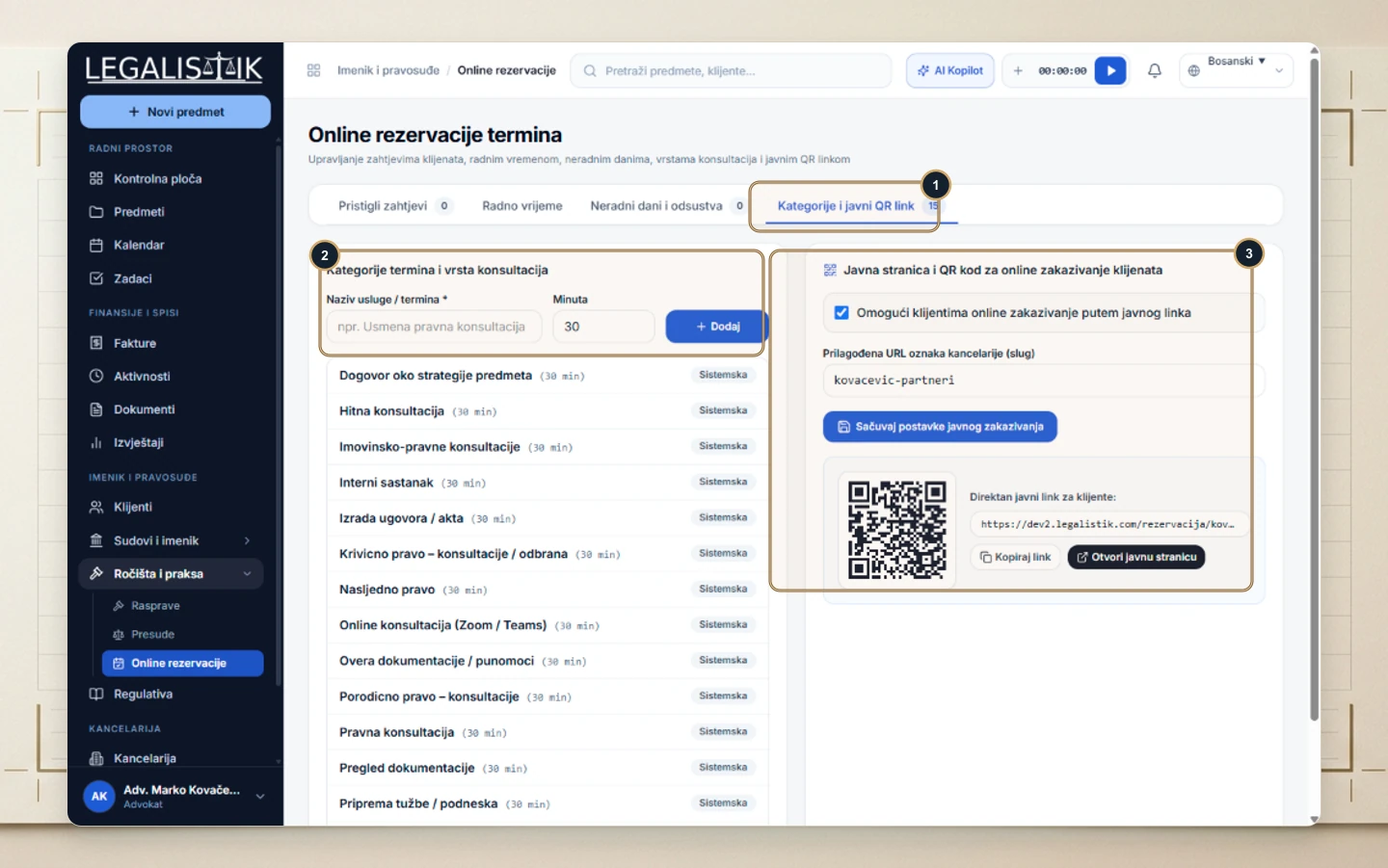
1. Consultation Categories & Tailored Office Hours
Start with 15 ready-made consultation categories—spanning corporate advisory, real estate matters, contract drafting, and online Zoom/Teams reviews—or customize slot lengths to match how your firm works. You define weekday availability hours independently for the practice alongside holiday and vacation exclusions.
2. Custom Firm URL & Printable QR Code
Enabling public booking generates a dedicated firm URL slug and a downloadable QR code. Firms commonly place the link on their law firm website, Google Business profile, and email signatures, while printing the QR code on business cards and reception signage.
How Clients Book—and How Partners Keep 100% Control
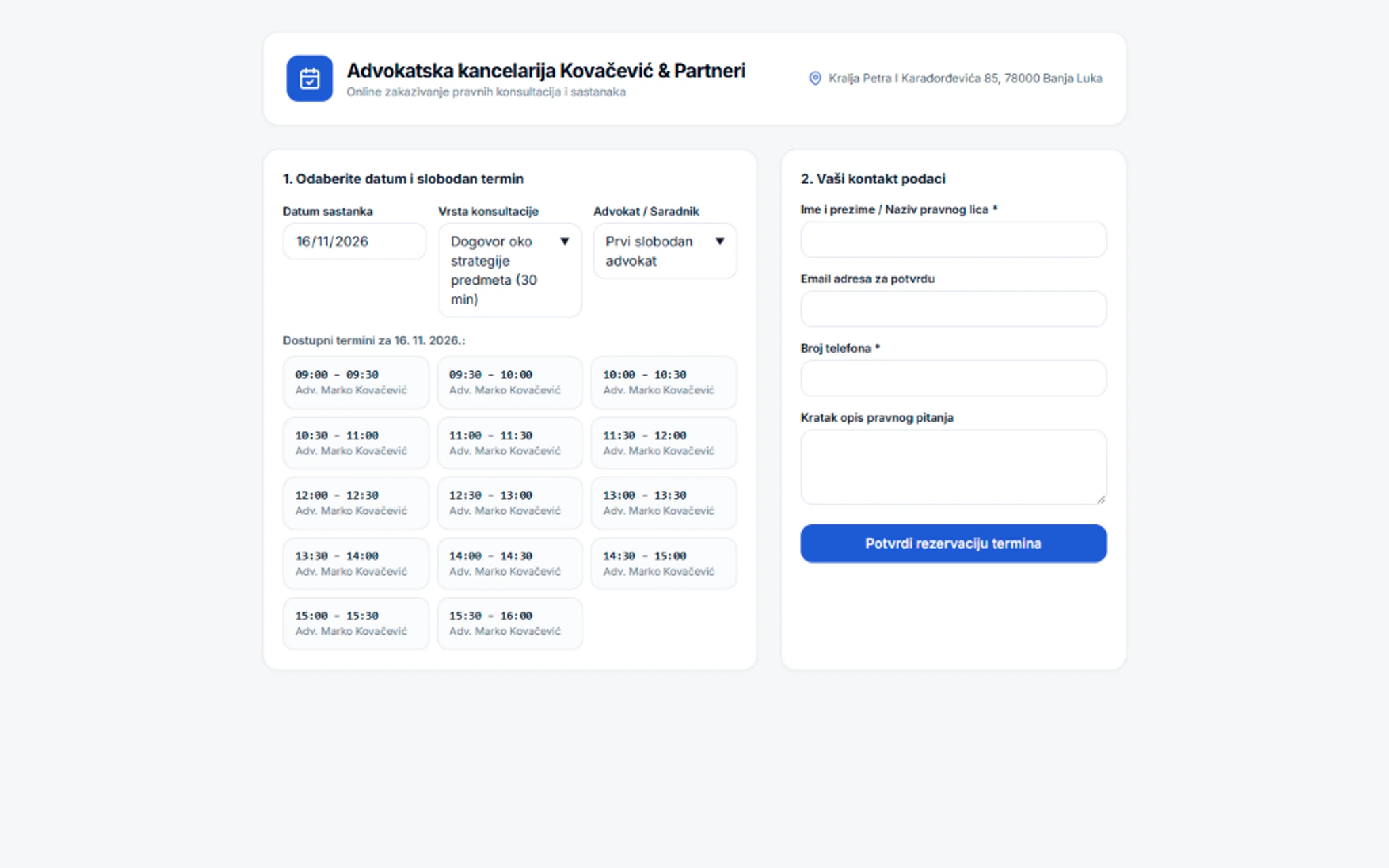
When visiting your booking link, prospective or existing clients select a consultation type, pick a preferred attorney (or First Available), choose an open date and time slot, and submit their contact information along with a brief summary of their legal matter.
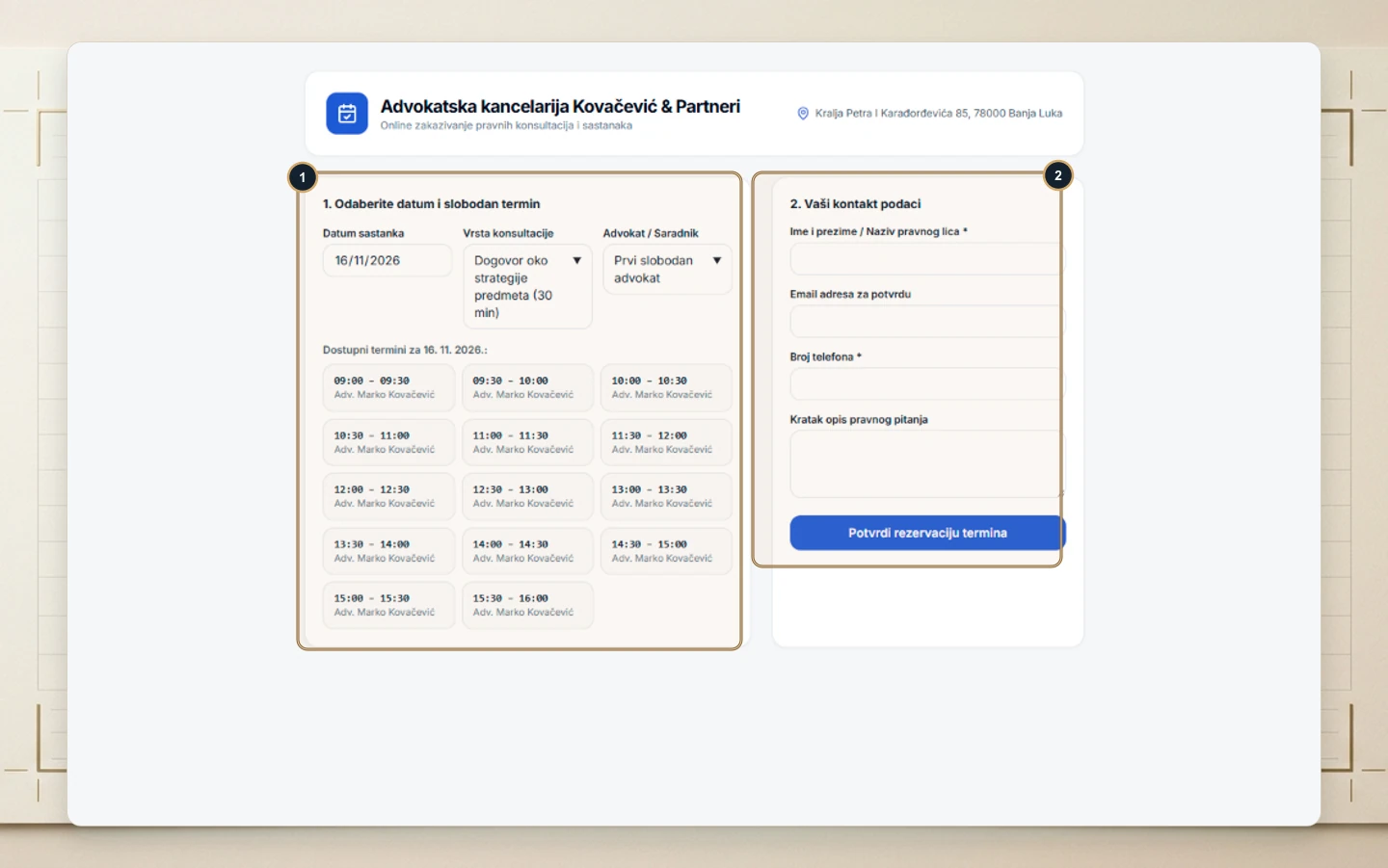
Crucially, nothing hits your official calendar unvetted. Every incoming request appears immediately on your Dashboard marked Pending. With a single click, you can Approve the consultation—automatically sending a confirmation email to the client and logging the appointment—or Decline with an explanatory note if a conflict of interest or scope mismatch exists.
Managing Holidays, Slot Durations & Multi-Attorney Routing
Beyond recurring weekly schedules, firms can add date exceptions for statutory holidays, vacations, or full-day trials out of town so unavailable slots never appear online. In multi-attorney practices, each partner or senior associate maintains individual calendar colors and working schedules while letting incoming clients pick either a named attorney or the earliest open slot. Automated email confirmations include exact office directions or online meeting notes, significantly lowering consultation no-shows while keeping intake records centralized inside the firm’s contact database.
Scheduling Methods Compared for Legal Intake
| Intake Capability | Phone & Manual Email | Generic Scheduling Apps | Legalistik Online Booking |
|---|---|---|---|
| Client Booking Hours | Office hours only | 24/7 via external widget | 24/7 synced with live firm calendar |
| Court Hearing Protection | Manual planner cross-check | Disconnected from case dockets | Automatically hides hearing & task blocks |
| Conflict-Check Gate | Verbal screening on call | Often auto-confirms instantly | One-click partner Approve or Decline |
| CRM & Case Integration | Manual data entry into spreadsheets | Requires fragile third-party connectors | Linked natively to your Client Registry |
| Subscription Cost | Hidden staff overhead | Extra monthly per-seat add-on | Included even on the free Basic (€0) plan |
Five Practical Steps to Launch Frictionless Client Intake
- Ring-fence court mornings: Keep mornings reserved for hearings and open afternoon consultation blocks on dedicated weekdays.
- Specify pre-meeting documents: Use service descriptions to tell clients which contracts, court notices, or IDs to bring or prepare.
- Embed across mobile touchpoints: Add your booking URL directly to your Google Maps listing where mobile prospects look first.
- Share links with existing clients: Replace three-email scheduling threads for quick case updates by sending your direct booking link.
- Pair with mobile practice tools: Explore how our Solo Practitioners solution combines self-booking with mobile docket access in court.
Conclusion
Moving client consultation scheduling online eliminates repetitive phone interruptions while giving clients a responsive, modern intake experience 24 hours a day. Your team retains full approval authority, avoids courtroom scheduling conflicts, and captures structured case context before the meeting even begins.
If you are building the internal business case for partners first, also read our companion overview of the 7 business benefits of online consultation booking, or compare plan inclusions on our Pricing page.